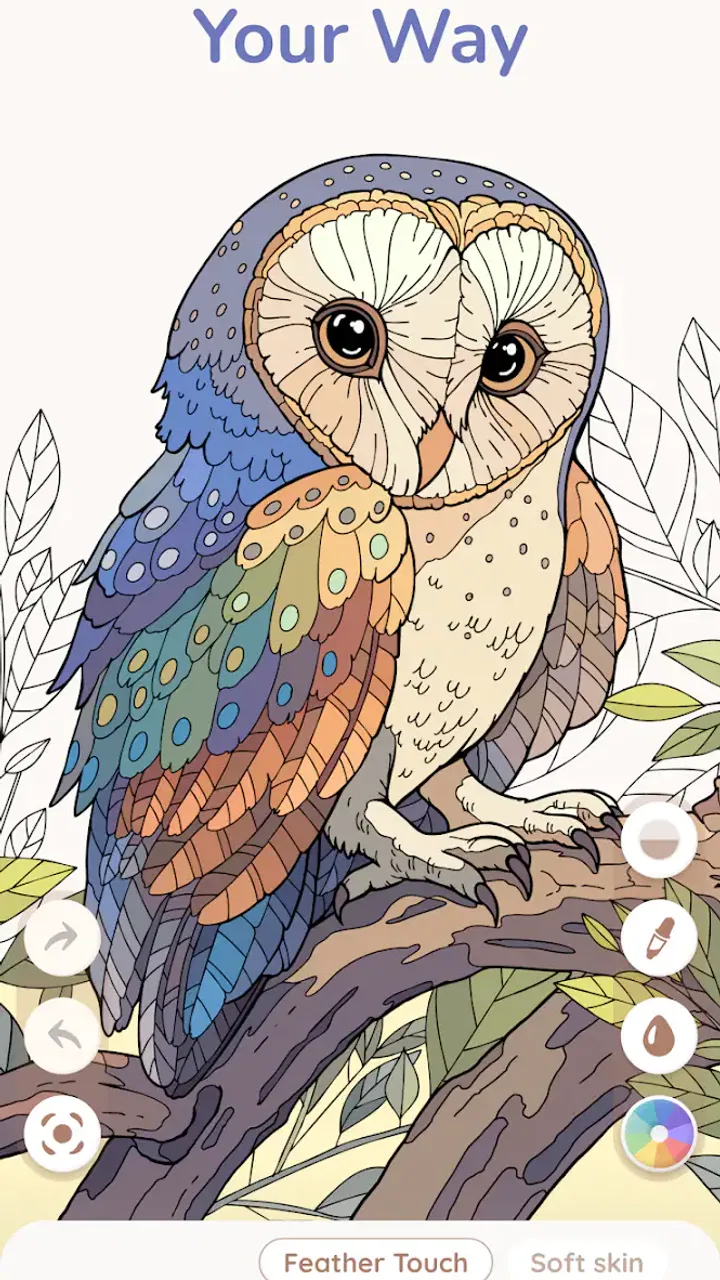
Happy Art: Color Your Way
- 4.3
- Rating
- 10.00K
- Installs
- Free
- Price

 Analysis by App-foxy
Coloring games are usually easy to understand, but they are not always friction-free in daily use. Happy Art: Color Your Way takes a familiar board-game-style coloring idea and keeps the main action simple: choose a page, pick colors, and paint without following numbered spaces. I found that straightforward approach appealing when I wanted something calm rather than competitive, although the experience depends heavily on how comfortable you are with touch controls and a slower, detail-focused rhythm.
The game is made by OONA and is free to start. It is listed for Everyone, so it is suitable for a broad audience, including children using a device with adult guidance and adults looking for a quiet break. The current release is version 1.0.3 and works on Android 7.0 or later. Its average score is 4.3 from around two hundred ratings, with roughly thirty written reviews, while the download count has passed ten thousand. Those figures suggest a modest but real player base rather than a huge, crowded platform.
What makes the first session easy, and where it can become awkward
The strongest part of the concept is that there is no pressure to match a printed number. In a traditional paint-by-number game, every area has a prescribed color, and the satisfaction comes from completing the instructions. Here, the appeal is more personal. I can decide whether a flower should be realistic, bright, unusual, or deliberately simple. That makes the game feel closer to a digital coloring book than to a puzzle that expects one correct answer.
You May Also Like

 AccuWeather: Weather Radar
AccuWeather Review: A Quick, Clear Forecast for Everyday Decisions
For everyday plans, the best forecast is the one you can understand quickly. AccuWeather makes rain timing, radar, and local conditions easy to act on, with a few trade-offs.

 Hill Climb Racing
Why Hill Climb Racing Still Turns Crashes Into One More Run
A tiny car, a bumpy hill and one more upgrade: Hill Climb Racing keeps resurfacing because its simple chaos makes every near-miss feel personal.

 AliExpress - Shopping App
AliExpress Makes Global Shopping Feel Personal, but Shoppers Bear the Risk
AliExpress turns a global marketplace into a pocket-sized discovery engine. Its reach is useful, its shopping loop compelling, and its trade-offs easy to miss.

 Lords Mobile: Kingdom Wars
Lords Mobile Is a Kingdom-Building Routine, Not a Quick Match
A case-by-case verdict on the building, battles, device demands, and social commitments that make Lords Mobile rewarding for some players and exhausting for others.

 PDF Scanner app - TapScanner
TapScanner Makes Paperwork Easier to Capture, Check, and Share
TapScanner makes scanning with a phone feel less like a rescue operation and more like a dependable step in getting work done. Its capture tools are useful, though not flawless.

 Block Blast!
 Shows How Much a Puzzle Game Can Leave Out
A quiet grid game shows why puzzle players increasingly value instant clarity, repeatable skill and low-pressure play—and where the genre still needs to catch up.
More From Our News Desk
View All News


That freedom is also the first place where some players may hesitate. If you prefer clear objectives, exact solutions, or a visible score, an open-ended coloring page can feel less engaging. I would not choose this as a replacement for a competitive board game, a logic puzzle, or a structured challenge. Its value is in the act of filling an image and making small visual decisions, not in beating an opponent or optimizing a result.
The safest way to approach the first launch is to treat it as a short test rather than expecting a long session immediately. Check that the game opens normally, look at how the page responds to a tap, and try a small area before committing to a detailed illustration. This simple check matters on phones with smaller displays, where a finger can cover a narrow section and make precise coloring feel less comfortable.
I also recommend beginning with a page that has large, distinct spaces if the selection gives you that choice. It lets you learn the touch response without turning the first attempt into a precision exercise. Once the controls feel natural, smaller sections become more enjoyable because you are making deliberate choices instead of fighting the interface.
Setup checks that prevent avoidable frustration
Because the game supports Android 7.0 and newer, compatibility should be one of the first things to check before troubleshooting anything more complicated. If the device uses an older system, installation or normal operation may not be possible. On a compatible phone or tablet, I would still make sure the operating system is reasonably up to date and that there is enough free storage for a smooth installation.
A stable connection is sensible during installation and whenever the app is first opened, even though the core idea is a coloring activity rather than an online competition. If a download pauses, the game fails to install, or the first launch appears stuck, I would check the connection, restart the store app, and try again before assuming the game itself is broken. Switching between a weak mobile signal and a reliable Wi-Fi connection can also separate a network issue from an application issue.
It is worth checking the device’s touch behavior too. A thick screen protector, a damp display, or a case that presses against the edge can make a coloring game seem inaccurate. Clean the screen, remove anything that interferes with taps, and test another app that requires ordinary touch input. If taps fail elsewhere, reinstalling Happy Art is unlikely to solve the real problem.
Storage and memory can create a similar false alarm. When a device is nearly full or many apps are open, installation and loading may become unreliable. Closing unused apps and freeing a little space are reasonable first steps. I prefer these low-risk checks to immediately deleting the game, especially if a coloring session is already in progress and the user has not considered whether local progress might be affected by removal.
The free entry point is helpful for trying the experience without paying first. However, the listing also shows in-app purchases priced at $8.49 per item. That is an important point for families: free to install does not mean every possible item or option is included at no cost. I would review purchase controls on the device before handing it to a child, and I would avoid treating a single in-app price as a complete description of the game’s overall cost.
A calmer workflow for coloring and recovering from mistakes
My preferred workflow is to start with a color plan, but keep it loose. I might choose two or three related shades for a subject, then add a contrasting color only when the image needs more energy. This prevents the page from becoming a random collection of taps while preserving the freedom that makes the game different from numbered coloring apps. It also makes the session feel purposeful without turning it into homework.
For detailed sections, I work from larger areas toward smaller ones. Large shapes establish the main mood of the picture, while narrow spaces can be handled later when the surrounding colors make the remaining choices easier. This is a practical advantage of a no-number format: I can change the visual direction as the page develops instead of being locked into a preset sequence.
Touch accuracy deserves a little strategy. I hold the device steadily, zoom in if the interface offers that control, and use short taps rather than dragging quickly across several areas. I would not assume that a missed tap means the game has lost progress. First, I check whether I touched an unpainted section, selected a different color, or simply placed my finger over the target. On a small screen, the hand itself is often the source of the confusion.
If the screen stops responding, I use a gradual recovery process. I wait briefly, try a normal tap outside the artwork, and then leave and reopen the game if necessary. I avoid repeatedly tapping the same area, because that can make it harder to tell whether the problem is a delayed response or an accidental selection. If the issue returns, I close other demanding apps, restart the device, and test again.
Reinstalling should be a later step, not the first one. Removing an app may clear information stored on the device, so I would only consider it after simpler checks and after deciding whether unfinished coloring work is worth protecting. The same caution applies to clearing app storage: it can be useful for corrupted local data, but it may also reset the app’s local state. A user should treat that as a last resort rather than routine maintenance.
Another useful habit is to finish a natural portion of a page before leaving. If I am interrupted, I stop after completing a recognizable section rather than halfway through a tiny detail. That makes it easier to see what remains when I return and reduces the chance of mistaking an unfinished area for lost work. It also fits the game’s best use case: short, repeatable relaxation rather than one long uninterrupted commitment.
When the game is not really the cause
Not every failure that appears while playing originates in Happy Art. If the entire phone is slow, other apps are also freezing, or taps are inconsistent across the system, the device may be overloaded. Restarting it and checking available storage are more appropriate than blaming the coloring game. This distinction is especially useful on older compatible hardware, where a technically supported system can still feel less responsive under heavier general use.
If installation fails but other downloads are failing too, the app store or network is the more likely place to investigate. Check the connection, confirm that the device meets the minimum operating-system requirement, and retry later if the service is temporarily struggling. If only this game has trouble while other apps install normally, then a fresh launch or reinstall becomes a more reasonable next step.
Unexpected purchase prompts should also be interpreted carefully. Since the game is free to install but includes items priced at $8.49 each, a payment screen may be part of an optional purchase flow rather than evidence that the basic download failed. I would read the screen before confirming anything, especially on a shared device. For children, device-level purchase restrictions are more dependable than simply explaining the rule once.
Battery drain, heat, or interruptions from notifications can make a quiet coloring session feel worse than it should. Reducing background activity, closing unnecessary apps, and playing with the device in a comfortable environment can help. These are general device checks, but they matter here because coloring requires steady attention; even minor pauses or missed taps become more noticeable when the activity is meant to be relaxing.
There is also a human cause that is easy to overlook: the chosen page may simply be too demanding for the moment. If I am tired, using a small phone, or trying to color while moving around, a highly detailed image can feel frustrating. Switching to a simpler page or using a larger screen is a better response than concluding that the whole game is inaccurate. The experience depends on the match between the artwork, the device, and the player’s patience.
Who will enjoy this more than the usual alternatives
I see Happy Art as a good fit for people who want creative control without learning a drawing program. Compared with a conventional paint-by-number app, it removes the pressure to obey a fixed palette. Compared with a full digital art app, it is a gentler starting point because the user is working inside prepared coloring pages rather than building every shape from scratch. That middle ground is its clearest identity.
It can work well during a short break after work, while waiting for an appointment, or as a quiet evening activity. A realistic scenario would be taking a phone for ten minutes after dinner, choosing one page, and completing only a few sections. The session has a visible result without requiring the concentration of a strategy game. For a child, it can offer an easy creative activity, although an adult should handle purchase settings and make sure the device’s controls are appropriate.
The game is less suitable for someone who wants a social experience, a competitive leaderboard, or a deep progression system. It is also not the best choice for an artist who needs layers, advanced brushes, or precise professional control. A dedicated drawing tool is better for that purpose, while a numbered coloring app may be more satisfying for a player who enjoys instructions and completion targets.
One trade-off is that creative freedom can reduce replay structure. After finishing a page, the main reward is the image you created and the calm process of making it. Players who need frequent unlocks, missions, or escalating difficulty may run out of motivation sooner than players who enjoy revisiting the same kind of activity. That is not a flaw in the coloring concept, but it is an important expectation to set before installing.
The age rating of Everyone broadens its appeal, but it should not be confused with a guarantee that every child will find the controls effortless. Younger users may need help choosing colors, correcting accidental taps, and understanding optional purchases. On a tablet, the larger workspace may be more comfortable; on a compact phone, the same page can demand more precision and patience.
My practical verdict after weighing the friction
What I like most is the simple creative decision at the heart of the game: I can color a prepared image without being told which shade belongs in every space. That makes it more personal than standard numbered coloring and much less intimidating than open-ended digital drawing. The free installation also makes it easy to test whether the pace suits you before spending anything.
What holds it back is the possibility of touch-related annoyance on a small or poorly responsive screen, along with the uncertainty that can come from an open-ended format. The purchase price attached to individual in-app items also means families should check controls before letting children explore alone. None of these points cancels the core appeal, but they affect whether the game feels relaxing in a particular setup.
My advice is to install it on a compatible device, test a simple page first, and judge it by the quality of the coloring session rather than by expectations borrowed from puzzle or art apps. Keep the screen clean, use a stable connection for setup, and treat reinstalling or clearing storage as later troubleshooting steps. If you want a quiet activity built around personal color choices, this is an easy recommendation. If you need competition, detailed drawing tools, or a strong goal system, I would choose a different kind of game.
Overall, OONA’s board-category game succeeds when used as a small creative pause. It does not need to become a major hobby to be worthwhile. For me, its best role is a low-pressure way to finish part of an image, experiment with color, and put the phone down feeling that I made something. Choose it for relaxed coloring freedom, not for structured challenge.
FAQs for Happy Art: Color Your Way
01What is Happy Art: Color Your Way?
Happy Art: Color Your Way is a creative app designed for users who enjoy coloring and art. It offers a wide range of coloring pages, tools, and palettes that cater to both beginners and experienced artists. The app provides a relaxing way to unwind while exploring your artistic side.
02Is Happy Art: Color Your Way free to use?
Happy Art: Color Your Way offers a free version with basic features and a selection of coloring pages. However, it also includes in-app purchases and subscription options for users who want access to premium content, additional tools, and exclusive designs. This ensures a comprehensive experience for all users.
03What devices are compatible with Happy Art: Color Your Way?
The app is available for both Android and iOS devices. It is compatible with most smartphones and tablets running the latest operating systems. Ensure your device meets the necessary software requirements to enjoy a seamless coloring experience without any technical issues.
04Does Happy Art: Color Your Way require an internet connection?
While an internet connection is needed to download the app and access certain features, such as new designs and updates, many of its core functionalities can be used offline. This allows users to enjoy coloring anywhere, anytime, without worrying about connectivity.
05How does Happy Art: Color Your Way support creativity?
Happy Art: Color Your Way supports creativity by offering a diverse library of images and tools. Users can experiment with colors, textures, and styles, fostering artistic expression. The app also includes tutorials and tips to help users improve their skills and explore new techniques.
Pros
- User-friendly interface makes coloring easy.
- Wide variety of coloring pages available.
- Offline mode for uninterrupted access.
- High-quality graphics enhance experience.
- Regular updates with new content.
Cons
- Contains in-app purchases for premium features.
- Occasional ads can interrupt gameplay.
- Limited free content without subscription.
- No option for custom color palettes.
- Some features require a stable internet.

Happy Art: Color Your Way
Gallery